
Your Microsoft 365 tenant is already a compliance platform. We switch it on.
Practical Compliance installs in your own tenant and turns SharePoint, Dataverse, Power Automate and Copilot Studio into a working compliance program. Your SSP, evidence and POA&M stay in your environment, under your control.
Who are you protecting?
Three kinds of organizations, one way of working: compliance run inside Microsoft 365.
Defense contractors
Reach and keep CMMC Level 1 and Level 2 readiness in the Microsoft 365 you already run.
- SPRS preparation with a draft score
- SSP and POA&M drafted for you
- Evidence filed against each requirement
Federal integrators
Manage NIST SP 800-53 controls, authorization packages and continuous monitoring without a separate GRC system.
- Categorization to control selection
- SSP, POA&M and assessor workbook
- Review cycles that keep the package current
IT providers and MSPs
Turn compliance into a repeatable service on the Microsoft stack your clients already pay for.
- One isolated environment per client
- The same workflows for every client
- A standard, documented deployment
Compliance shouldn’t need its own island.
Most compliance platforms start by asking you to move in: upload your policies, recreate your inventory, invite your staff to another portal. But your evidence already lives in Microsoft 365. Copying it into a separate system creates a second source of truth that starts going stale the day the import finishes.
| Question | Traditional GRC platform | Practical Compliance |
|---|---|---|
| Where your evidence lives | A copy in the vendor's database | Where it already is, in your SharePoint |
| Who controls access | The vendor's user model | Your Entra ID groups and SharePoint permissions |
| What security reviews | A new vendor, a new SaaS, a new data flow | One more solution in a platform you've already approved |
| How work gets done | Staff log in to a separate portal | Staff work in SharePoint, Outlook and Teams |
| What happens when you leave | Export and hope | Your data never left |
Everything runs inside your tenant; nothing lives outside it.
Your tenant. Your data. Your rules.
Practical Compliance never takes custody of your compliance data. It runs inside your Microsoft 365 environment, so the controls you already have apply automatically.
- Customer-owned tenantThe solution installs into your environment. We don't operate a hosted copy.
- Customer-controlled permissionsAccess follows your Entra ID groups and SharePoint permissions.
- Customer-owned storageDocuments live in your SharePoint; records live in your Dataverse.
- Customer-controlled retentionYour Microsoft Purview retention, eDiscovery and audit policies apply as they do to everything else.
- If you stop subscribingAfter a 30-day grace period, you can no longer update your compliance data through the product. The data itself stays yours, exactly where it is.
One family. One framework per product.
Each product installs in your own tenant, focuses on one framework and keeps your documentation current through every review cycle.
Practical NIST RMF
Founding customersTake a system from categorization to an assessor-ready package. Track every NIST SP 800-53 control, generate your SSP and POA&M, and keep the package current after the ATO.
Explore Practical NIST RMF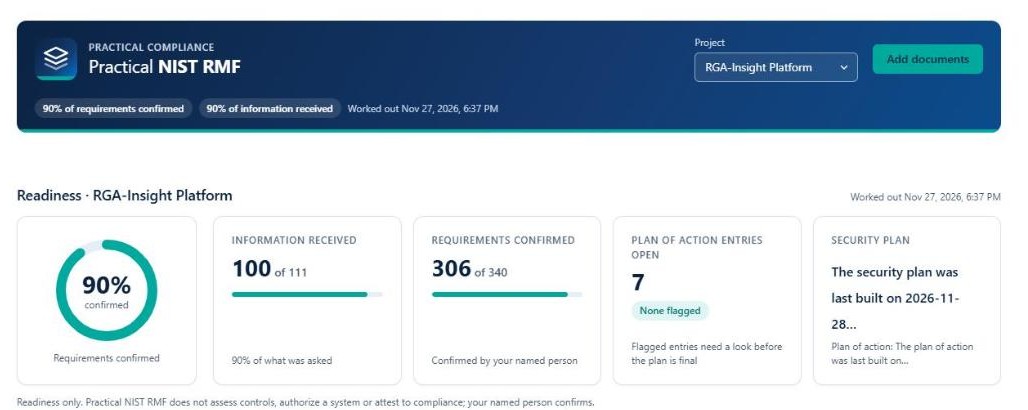
Practical CMMC
Founding customersReach and keep CMMC Level 1 and Level 2 readiness. Map your policies to every requirement, watch your draft SPRS score, and generate your SSP and POA&M.
Explore Practical CMMC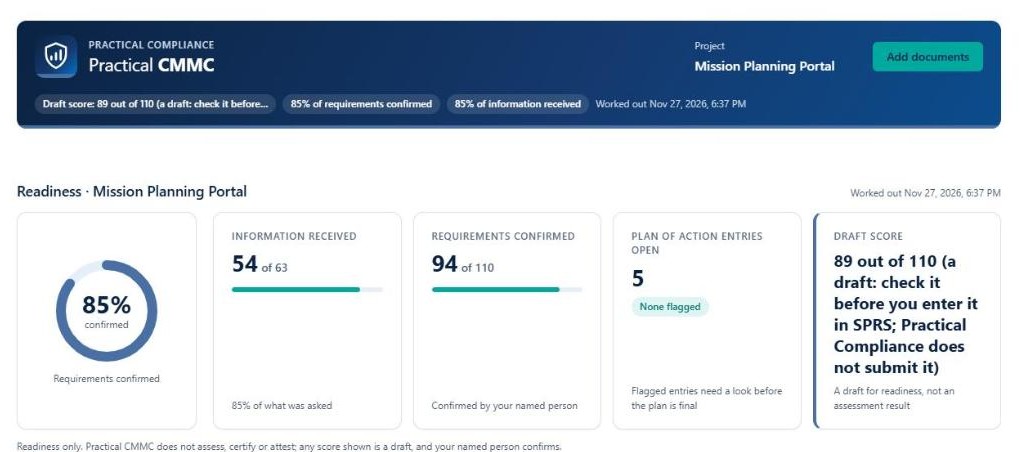
Practical Continuity
Build, review and exercise a continuity of operations or business continuity plan.
Practical SOC 2
Readiness and ongoing evidence upkeep for a SOC 2 audit.
Practical Compliance products are readiness aids. They don’t certify, authorize or attest to compliance, and they don’t replace a formal assessment or audit.
See the work it does for you.
Real screens from a test tenant, with fictional demo data.
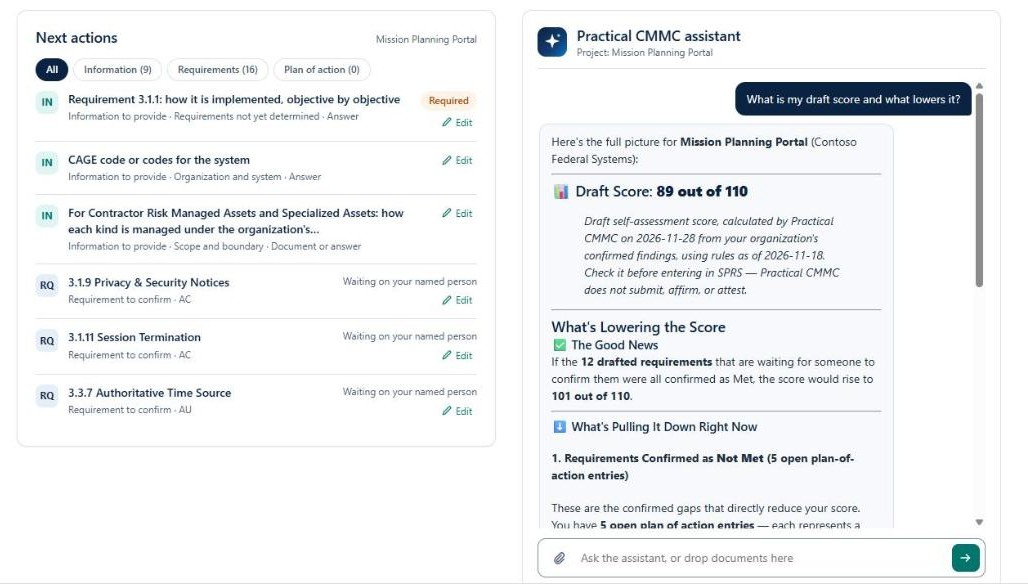
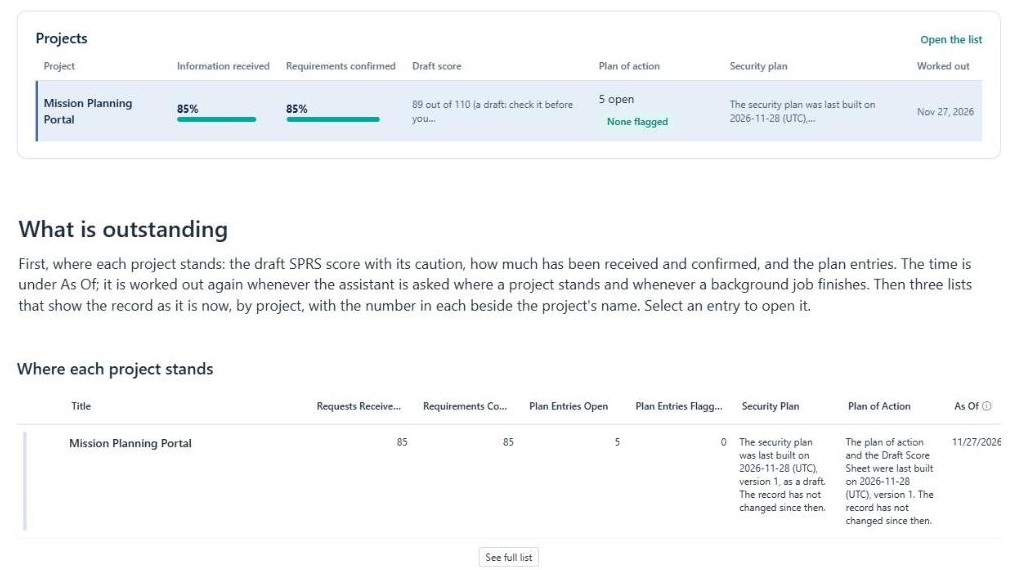
Installed and running in about two hours.
A first-time install and build of the product takes about two hours. Founding customers get it done with us, in their own tenant.
Confirm prerequisites
A checklist of the Microsoft licenses and admin roles you need, provided up front.
Run the installer
The installer builds the SharePoint site, Dataverse tables, flows and assistant in your environment.
Guided setup
Your organization, your first project and your reference documents.
Start working
Your team works with the assistant in SharePoint, with notices in Teams and Outlook.

Built by someone who has run IT, not just audited it.
“I’ve spent 25 years leading technology organizations, from a global DevOps group at McAfee and a SharePoint development team spread across three countries, to IT leadership at Guidance Software and in public-sector organizations in New Mexico and Florida, where CJIS compliance was part of the job. Over and over, I watched compliance become a separate project with its own tools, its own copies of documents and its own silo. Practical Compliance is the product I wanted in those jobs: compliance work done where the work already happens, in Microsoft 365, under your control.”
Duran, Founder and President, The Practical CIO
Ten organizations will deploy with the founder directly involved.
Founding customers deploy Practical CMMC or Practical NIST RMF with guided help, and shape what ships next.
founding customers. When those seats are filled, the program closes.
In return we ask for honest feedback, a reference call or case study when you’re ready, and permission to name your industry (not your company).
Questions buyers ask
Does our data ever leave our Microsoft 365 tenant?
What Microsoft licenses do we need?
Does Practical Compliance certify us or replace an assessor?
Do you support GCC and GCC High?
How long does deployment take, and who does it?
What happens to our data if we stop subscribing?
Can an IT provider or MSP run this for multiple clients?
How is it priced?
Do we need this if we already use Microsoft Purview Compliance Manager?
Still have questions? Book a walkthrough
See your compliance program running inside Microsoft 365.
30 minutes, your questions, a live product. No slides.