
Your SPRS score is a signed statement. Make sure it’s backed by evidence.
Practical CMMC tracks every practice, maps your existing policies to requirements, and drafts the SSP and POA&M, all inside your own tenant.
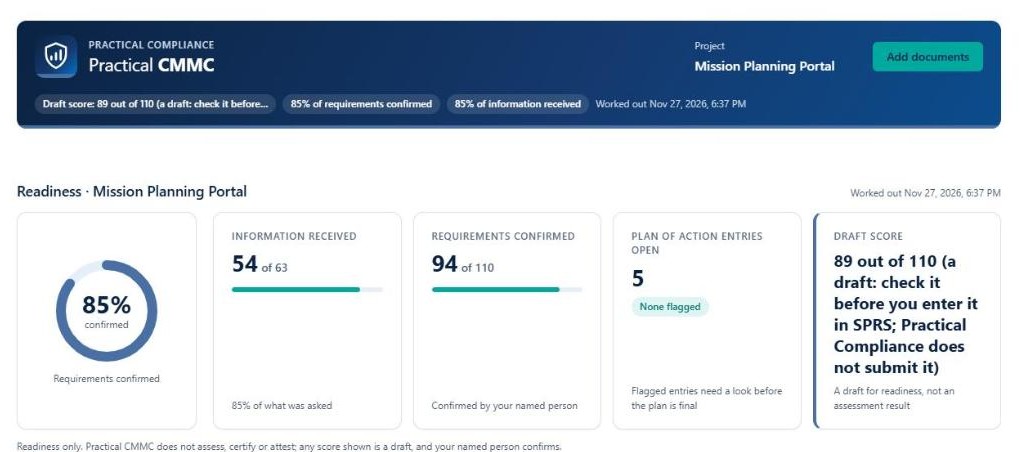
From scattered documents to a readiness program you can defend.
CMMC Level 1
Complete the 15 Level 1 requirements with evidence on file and an annual affirmation you can stand behind.
CMMC Level 2
Work through all 110 NIST SP 800-171 requirements with owners, due dates and evidence linked to each one.
SPRS preparation
See your draft score, what lowers it, and which confirmations would raise it.
SSP creation
Generate a System Security Plan from the implementation statements and evidence already in your environment.
Evidence management
Drop documents in an intake folder. They’re read, classified, filed against the right requirements and flagged where they conflict.
Stay ready
Review cycles and reminders keep your documentation current after the first assessment.
Built where your evidence already lives.
Evidence never leaves
Policies, plans and evidence stay in your tenant.
Your access model
Access follows your Entra ID groups and SharePoint permissions.
One review, not a new vendor
Your security team reviews one more solution in a platform it already approved.
Where people already work
Reminders and notices arrive in Outlook and Teams.
Installed and running in about two hours.
A first-time install and build of Practical CMMC takes about two hours. Founding customers get it done with us, in their own tenant.
Confirm prerequisites
A checklist of the Microsoft licenses and admin roles you need, provided up front.
Run the installer
The installer builds the SharePoint site, Dataverse tables, flows and assistant in your environment.
Guided setup
Your organization, your first project and your reference documents.
Start working
Your team works with the assistant in SharePoint, with notices in Teams and Outlook.
Ten organizations will deploy with the founder directly involved.
Founding customers deploy Practical CMMC or Practical NIST RMF with guided help, and shape what ships next.
founding customers. When those seats are filled, the program closes.
In return we ask for honest feedback, a reference call or case study when you’re ready, and permission to name your industry (not your company).
See it on a realistic project.
30 minutes, your questions, a live product. No slides.